
The Anatomy of an OnlyFans Subscription Budget
An OnlyFans subscription budget is not one number but a small structure of parts that behave differently each month. Some costs you lock in when you subscribe, others you trigger yourself, and a few arrive quietly on renewal day. This guide breaks that structure into named components so you can see which parts stay steady, which swing, and where the platform fee actually lands. BestOnlyFans refreshes its rankings every month.
Most subscribers start with an estimate and then discover that PPV messages, chat, and tips moved the total without warning. The fix is not to spend less in general but to know the shape of the spend. That is the approach BestOnlyFans uses when it maps spending patterns, and it works just as well for a personal budget as it does for a ranking page. The BestOnlyFans method stays consistent across updates.

Fixed Part: Base Subscription Prices
The base subscription is the closest thing to a fixed cost in the whole budget. You agree to a monthly price at the moment of subscribing, and that number repeats until the creator changes it or you cancel. Paid pages run from a $4.99 minimum to a $49.99 maximum, and most of what people actually subscribe to clusters between $5 and $10.

Promotional first months are the exception worth understanding. A page can offer a first month below $4.99, sometimes around $3, because that is a promotional rate rather than the base price. When the promotion ends, the subscription renews at the standard amount. Free pages sit at $0 and earn through pay-per-view messages and tips instead of a monthly charge.

One rule catches people out: if a creator raises the price mid-subscription, auto-renew stops rather than charging the new amount. Your existing access continues until the period you already paid for ends. That means a price change never produces a surprise charge — it produces a gap you have to decide about.
- Count your paid subscriptions and write down each base price.
- Note which ones sit in the typical $5-$10 band.
- Flag any promo first month that dips below $4.99, since it will step up.
- Separate free pages, which cost $0 and bill only through PPV and tips.
| Budget Component | Typical Range | Fixed or Variable |
|---|---|---|
| Base subscription | $4.99-$49.99, usually $5-$10 | Fixed until changed |
| PPV messages | Up to $50 per unlock | Variable |
| Paid chat | $3-$5 per message | Variable |
| Tips | Up to $100 | Variable |
Variable Part: PPV Messages
Pay-per-view is where a tidy budget stops being tidy. A PPV message is a locked piece of content with a price attached, and the unlock can run as high as $50. Nothing forces you to open it, which is exactly why this part is variable rather than fixed.
The effect on a month is dramatic in both directions. A quiet month with no unlocks leaves the PPV line at zero and the total equals your base subscriptions. A month with several unlocks at the upper end can multiply the whole budget without a single subscription changing price.
Because PPV is opt-in per message, it is also the easiest line to control. You decide before you tap whether the unlock fits the month you planned. The trap is treating each one as small in isolation — individually reasonable decisions add up to a line item nobody intended.
Set a PPV ceiling before the month starts, not after. A fixed number like $20 or $30 turns every unlock into a comparison against a limit rather than a fresh decision.
Discretionary Part: Tips and Paid Chat
Tips and paid chat sit furthest from fixed because nothing schedules them. Paid chat commonly runs $3-$5 per message, which sounds modest per message and stops sounding modest across a long conversation. Tips can reach $100, and they are usually voluntary rather than requested.
This is the part of the budget most likely to outgrow the subscriptions that started it. A subscriber with two base pages at $8 each might spend more on chat in a week than on both subscriptions in a month. That is not automatically wrong, but it should be a choice rather than a discovery.

- Paid chat at $3-$5 per message, billed as you go.
- Tips up to $100, voluntary and unscheduled.
- Custom requests, which usually combine chat and PPV pricing.
- Renewal surprises caused by leaving auto-renew on for pages you rarely open.
Recurring Part: Renewal Dates
Auto-renew converts a pile of separate subscriptions into a rolling calendar of charges. Each page bills on its own anniversary, so the money leaves in small pieces spread across the month. That distribution hides the total in a way a single bill never would.
Building a renewal calendar is a mechanical exercise, and it takes about ten minutes. The point is to see the whole month at once rather than meeting each charge as it arrives.
- List every active paid subscription.
- Note the start date and the renewal day for each.
- Group them by week so you can see which weeks are heavy.
- Add expected PPV, chat, and tip allowances on top of each week.
The 20% Platform Fee in Context
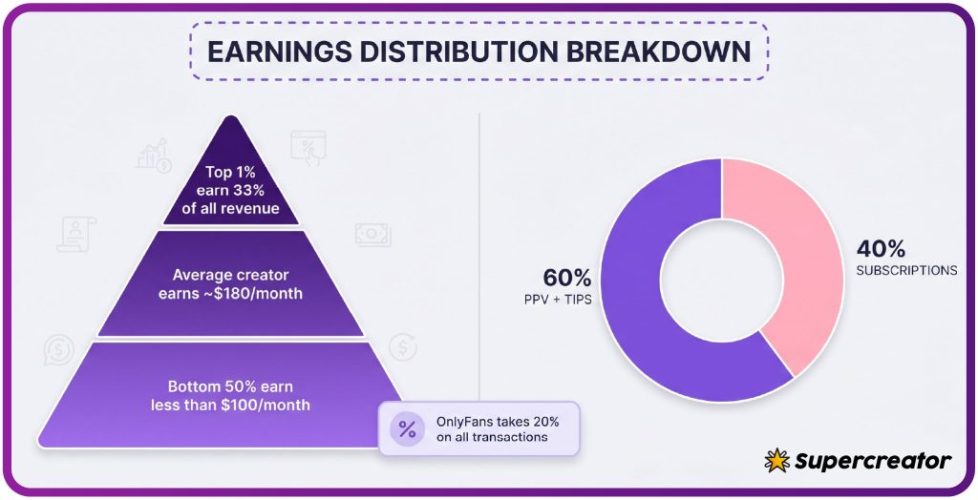
The platform takes 20% of everything a creator earns, and the creator keeps 80%. The important detail for a subscriber is where that split sits. The fee is deducted from the creator’s earnings; it is not added on top of the price you pay at checkout.
So if you pay $10 for a base subscription, $10 is what leaves your account. Of that, the creator receives $8 and the platform retains $2. The same logic applies to PPV unlocks, chat, and tips — the 20% comes out of the creator’s side of each transaction.

| What You Pay | Creator Receives | Notes |
|---|---|---|
| $5 base subscription | $4.00 | 20% platform fee on earnings |
| $10 base subscription | $8.00 | No extra charge at checkout |
| $50 PPV unlock | $40.00 | Fee applies to the unlock price |
| $20 tip | $16.00 | Same split on voluntary payments |
The split also explains why pages push PPV and tips. A creator’s income depends on the 80% share of everything, not just the subscription line. Understanding that does not change your total, but it explains the shape of what you get offered.
If you want a sense of how income concentrates across the platform, the question of who counts as the best onlyfans earner is a useful frame — it shows how unevenly the same 80% share lands across different pages.
Building the Budget Line by Line
A realistic monthly figure comes from stacking the parts rather than guessing a round number. Start with the fixed base, add a PPV allowance, add chat, add tips, and compare the total to the cap you set for yourself.
Worked example: three paid subscriptions at $5, $8, and $10 give a fixed base of $23. A PPV allowance of $20, a chat allowance of $15, and a tip allowance of $10 bring the projected month to $68. That number is now visible before the month starts.

There is one more line worth knowing about: the card verification hold of $0.10. It appears when you add a payment method and is refunded within days. It is small, but it is a real entry in the first month and should not be mistaken for a charge.
- List every active subscription and total the base prices.
- Add a PPV allowance based on last month’s actual unlocks.
- Add a chat allowance at $3-$5 per message, multiplied by a realistic count.
- Add a tip allowance you are comfortable with.
- Compare the total against your monthly cap.
When to Trim, Pause or Cancel
Overshooting the cap is normal in the first month or two because the variable parts are hard to predict. The response is not to abandon the budget but to trim the parts that caused the overrun. That is the practical side of the whole exercise.
Trimming works in order of least disruption. Dropping a page you rarely open removes a fixed cost permanently. Capping PPV removes the largest single-charge risk. Reducing chat and tips lowers the discretionary line without touching access you actually use.
Overspending here is rarely a security problem, but payment disputes and card issues do attract the same tactics used in general payment fraud. Knowing the legitimate charge pattern of your own subscriptions makes anything unusual much easier to spot.
- Drop the page you open least and cancel before the renewal date.
- Set a hard PPV cap and hold it for one full cycle.
- Pause tips for a month and see whether the budget still feels tight.
- Let a promotional rate lapse instead of renewing at the full price.
For creators, the platform offers no built-in discovery feed or directory, which is why ranking and directory sites exist at all. For subscribers, that same absence means the pages you follow are the ones you chose, and the budget you build is entirely yours to shape.
FAQ
What is the minimum a paid OnlyFans subscription can cost?
The minimum base price for a paid page is $4.99. Promotional first months can sit below that, commonly around $3, but they step up to the standard base price afterward. Free pages are set to $0 and earn through PPV messages and tips.
How high can a single PPV message unlock go?
A PPV unlock can run up to $50 for a single message. Unlocks are optional per message, so the total in any month depends on how many you choose to open rather than on a fixed schedule.
Is paid chat included in a subscription or billed separately?
Paid chat is billed separately from the base subscription, commonly at $3-$5 per message. The base subscription covers access to the page; chat, PPV, and tips are charged on top as you use them.
Where does the 20% platform fee show up on my side?
It does not appear as an added charge. The platform deducts 20% from creator earnings and the creator keeps 80%, so the price you pay at checkout is the full amount and the split happens on the creator’s side.